Digital Marketing - latest update
Digital Marketing Update - Latest update
- YouTube Adds New 'Shorts' Shortcut Button to User Home Screens in India. Read More
- Google Search Console brings back the request indexing tool. Read More
- Google confirms passage indexing is not yet live. Read More
- Bing Webmaster Tools adds Microsoft Clarity integration. Read More
- Google Testing New People Also Search For Location. Read More
- Google Search Streamed 3D Content Including Cars. Read More
- Google Tests Square & Multicolored Search Result Category Buttons. Read More
Digital Marketing Update - New Things in the Digital Industry you need to know!
- Google Search New Look For Question & Answers Carousel, Combines Multiple Sites. Read Here
- Google Web Stories ads now available via Display Network. Read Here
- Twitter to let users share tweets as stickers on Snapchat stories. Read Here
- Facebook's Testing an Instagram Content Calendar in its Creator Studio Tool. Read Here
- Instagram Tests Adding Timers to Stories to Boost Engagement. Read Here
- WhatsApp Brings New ‘Add to Cart’ Button to Enhance Shopping Experience. Read Here
- Shopping is coming to Instagram Reels globally, turning the whole app into a catalog. Read Here
- Facebook's Looking to Take on Cameo with a New Celebrity Streaming Option. Read Here
- LinkedIn Adds New 'Products' Tab on Company Pages to Highlight Specific Products. Read Here
- Facebook Adds New Monetization Tools for Gaming Streamers. Read Here
- YouTube Shares New Insights into Emerging Video Trends. Read Here
Get all latest updates about the Digital Marketing Platforms.
I have created this blog with all basic & technical information that helps new digital marketers, Now the tons of information available in Google, but new digital marketer has to browse a number of websites to get relevant & authentic information.
Now In this series, I have come up with the advanced level information that one should know. Hoping this digital marketing information with keep you update & help in enhancing the knowledge. My aim to spread important information & make digital marketers aware of the platform they are using for digital marketing activities.
We all know the platform Google, Facebook, Twitter, Linkedin &, etc, work on these platforms on daily basis to improve your SEO & Social Media efforts. But sometimes the process becomes monotonous & the outcomes too. To break the dead loop we should keep upgrade ourselves with platform expertise, market knowledge & new ideas to market our products/ services,
This is the one simple & small initiative for entry-level & 2 - 3 years of experienced digital marketers, Experts are always welcome to discuss the things. Stay tuned to this blog, I am coming with the exciting & latest information about digital marketing platforms.
By
Admin
What is hCard and how it works?
Here is hCard Creator.
Example [edit]
Consider the HTML:
<ul>
<li>Joe Doe</li>
<li>Jo</li>
<li>The Example Company</li>
<li>604-555-1234</li>
<li><a href="http://example.com/">http://example.com/</a></li>
</ul>
With microformat markup, that becomes:
<link rel="profile" href="http://microformats.org/profile/hcard">
...
</head>
...
<ul class="vcard">
<li class="fn">Joe Doe</li>
<li class="nickname">Jo</li>
<li class="org">The Example Company</li>
<li class="tel">604-555-1234</li>
<li><a class="url" href="http://example.com/">http://example.com/</a></li>
</ul>
Here the properties fn,[5] org (organization), tel (telephone number) and url (web address) have been identified using specific class names; and the whole thing is wrapped in class="vcard" which indicate that the other classes form an hcard, and are not just coincidentally named. If the hCard is for an organization or venue, the fn and org classes are used on the same element, as in <span class="fn org">Wikipedia</span> or <span class="fn org">Wembley Stadium</span>. Other, optional, hCard classes also exist.
It is now possible for software, for example browser plug-ins, to extract the information, and transfer it to other applications, such as an address book.
Geo and adr [edit]
The Geo microformat is a part of the hCard specification, and is often used to include the coordinates of a location within an hCard.
The adr part of hCard can also be used as a stand-alone microformat.
Live example [edit]
Here are the Wikimedia Foundation's contact details as of 2010-10-28, as a live hCard:
Wikimedia Foundation Inc.
149 New Montgomery Street, 3rd Floor
San Francisco, CA 94105
USA
Phone: +1-415-839-6885
Email: info@wikimedia.org
Fax: +1-415-882-0495
The mark-up (wrapped for clarity) used is:
<div class="vcard">
<div class="fn org">Wikimedia Foundation Inc.</div>
<div class="adr">
<div class="street-address">149 New Montgomery Street, 3rd Floor</div>
<div> <span class="locality">San Francisco</span>, <abbr class="region" title="California">CA</abbr> <span class="postal-code">94105</span></div>
<div class="country-name">USA</div>
</div>
<div>Phone: <span class="tel">+1-415-839-6885</span></div>
<div>Email: <span class="email">info@wikimedia.org</span></div>
<div>
<span class="tel"><span class="type">Fax</span>:
<span class="value">+1-415-882-0495</span></span>
</div>
</div>
Note that, in this example, the fn and org properties are combined on one element, indicating that this is the hCard for an organization, not a person.
Other attributes [edit]
Other commonly used hCard attributes include
bday - a person's birth date
honorific-prefix
honorific-suffix
label - for non-granular addresses
logo
nickname
note - free text
photo
post-office-box
Source
- wikipedia
Learn about the Canonical Link Element
That tells search engines that the preferred location of this url (the “canonical” location, in search engine speak) is http://example.com/page.html instead of http://www.example.com/page.html?sid=asdf314159265 .What’s “webspam,” as Google calls it, or search spam? Pages that try to gain better rankings through things like:
- Keyword stuffing
- Link schemes
- Cloaking, “sneaky” redirects or “doorway” pages
- Purposeful duplicate content
Keyword stuffing
"Keyword stuffing" refers to the practice of loading a webpage with keywords in an attempt to manipulate a site's ranking in Google's search results. Filling pages with keywords results in a negative user experience, and can harm your site's ranking. Focus on creating useful, information-rich content that uses keywords appropriately and in context.
To fix this problem, review your site for misused keywords. Typically, these will be lists or paragraphs of keywords, often randomly repeated. Check carefully, because keywords can often be in the form of hidden text, or they can be hidden in title tags or alt attributes.
Once you've made your changes and are confident that your site no longer violates our guidelines, submit your site for reconsideration.
- Link schemes
Your site's ranking in Google search results is partly based on analysis of those sites that link to you. The quantity, quality, and relevance of links count towards your rating. The sites that link to you can provide context about the subject matter of your site, and can indicate its quality and popularity. However, some webmasters engage in link exchange schemes and build partner pages exclusively for the sake of cross-linking, disregarding the quality of the links, the sources, and the long-term impact it will have on their sites. This is in violation of Google's Webmaster Guidelines and can negatively impact your site's ranking in search results. Examples of link schemes can include:
Links intended to manipulate PageRank
Links to web spammers or bad neighborhoods on the web
Excessive reciprocal links or excessive link exchanging ("Link to me and I'll link to you.")
- Buying or selling links that pass PageRank
The best way to get other sites to create relevant links to yours is to create unique, relevant content that can quickly gain popularity in the Internet community. The more useful content you have, the greater the chances someone else will find that content valuable to their readers and link to it. Before making any single decision, you should ask yourself the
It is not only the number of links you have pointing to your site that matters, but also the quality and relevance of those links. Creating good content pays off: Links are usually editorial votes given by choice, and the buzzing blogger community can be an excellent place to generate interest.
Once you've made your changes and are confident that your site no longer violates our guidelines, submit your site for reconsideration.
Cloaking, sneaky Javascript redirects, and doorway pages
- Cloaking
Serving a page of HTML text to search engines, while showing a page of images or Flash to users.
Serving different content to search engines than to users.
If your site contains elements that aren't crawlable by search engines (such as rich media files other than Flash, JavaScript, or images), you shouldn't provide cloaked content to search engines. Rather, you should consider visitors to your site who are unable to view these elements as well. For instance:
Provide alt text that describes images for visitors with screen readers or images turned off in their browsers.
Provide the textual contents of JavaScript in a noscript tag.
Ensure that you provide the same content in both elements (for instance, provide the same text in the JavaScript as in the noscript tag). Including substantially different content in the alternate element may cause Google to take action on the site.
- Sneaky JavaScript redirects
When Googlebot indexes a page containing JavaScript, it will index that page but it may not follow or index any links hidden in the JavaScript itself. Use of JavaScript is an entirely legitimate web practice. However, use of JavaScript with the intent to deceive search engines is not. For instance, placing different text in JavaScript than in a noscript tag violates our Webmaster Guidelines because it displays different content for users (who see the JavaScript-based text) than for search engines (which see the noscript-based text). Along those lines, it violates the Webmaster Guidelines to embed a link in JavaScript that redirects the user to a different page with the intent to show the user a different page than the search engine sees. When a redirect link is embedded in JavaScript, the search engine indexes the original page rather than following the link, whereas users are taken to the redirect target. Like cloaking, this practice is deceptive because it displays different content to users and to Googlebot, and can take a visitor somewhere other than where they intended to go.
Note that placement of links within JavaScript is alone not deceptive. When examining JavaScript on your site to ensure your site adheres to our guidelines, consider the intent.
Keep in mind that since search engines generally can't access the contents of JavaScript, legitimate links within JavaScript will likely be inaccessible to them (as well as to visitors without Javascript-enabled browsers). You might instead keep links outside of JavaScript or replicate them in a noscript tag.
- Doorway pages
Doorway pages are typically large sets of poor-quality pages where each page is optimized for a specific keyword or phrase. In many cases, doorway pages are written to rank for a particular phrase and then funnel users to a single destination.
Whether deployed across many domains or established within one domain, doorway pages tend to frustrate users, and are in violation of our Webmaster Guidelines.
Google's aim is to give our users the most valuable and relevant search results. Therefore, we frown on practices that are designed to manipulate search engines and deceive users by directing them to sites other than the ones they selected, and that provide content solely for the benefit of search engines. Google may take action on doorway sites and other sites making use of these deceptive practice, including removing these sites from the Google index.
If your site has been removed from our search results, review our Webmaster Guidelines for more information. Once you've made your changes and are confident that your site no longer violates our guidelines, submit your site for reconsideration.
- Duplicate content
Duplicate content generally refers to substantive blocks of content within or across domains that either completely match other content or are appreciably similar. Mostly, this is not deceptive in origin. Examples of non-malicious duplicate content could include:
Discussion forums that can generate both regular and stripped-down pages targeted at mobile devices
Store items shown or linked via multiple distinct URLs
Printer-only versions of web pages
If your site contains multiple pages with largely identical content, there are a number of ways you can indicate your preferred URL to Google. (This is called "canonicalization".) More information about canonicalization.
However, in some cases, content is deliberately duplicated across domains in an attempt to manipulate search engine rankings or win more traffic. Deceptive practices like this can result in a poor user experience, when a visitor sees substantially the same content repeated within a set of search results.
Google tries hard to index and show pages with distinct information. This filtering means, for instance, that if your site has a "regular" and "printer" version of each article, and neither of these is blocked with a noindex meta tag, we'll choose one of them to list. In the rare cases in which Google perceives that duplicate content may be shown with intent to manipulate our rankings and deceive our users, we'll also make appropriate adjustments in the indexing and ranking of the sites involved. As a result, the ranking of the site may suffer, or the site might be removed entirely from the Google index, in which case it will no longer appear in search results.
There are some steps you can take to proactively address duplicate content issues, and ensure that visitors see the content you want them to.
Use 301s: If you've restructured your site, use 301
Be consistent: Try to keep your internal linking consistent.
Use top-level domains:
Syndicate carefully:
Use Webmaster Tools to tell us how you prefer your site to be indexed: You can tell Google your preferred domain (for example, http://www.example.com or http://example.com).
Minimize boilerplate repetition: For instance, instead of including lengthy copyright text on the bottom of every page, include a very brief summary and then link to a page with more details. In addition, you can use the Parameter Handling tool to specify how you would like Google to treat URL parameters.
Avoid publishing stubs: Users don't like seeing "empty" pages, so avoid placeholders where possible. For example, don't publish pages for which you don't yet have real content. If you do create placeholder pages, use the noindex meta tag to block these pages from being indexed.
Understand your content management system: Make sure you're familiar with how content is displayed on your web site. Blogs, forums, and related systems often show the same content in multiple formats. For example, a blog entry may appear on the home page of a blog, in an archive page, and in a page of other entries with the same label.
Minimize similar content: If you have many pages that are similar, consider expanding each page or consolidating the pages into one. For instance, if you have a travel site with separate pages for two cities, but the same information on both pages, you could either merge the pages into one page about both cities or you could expand each page to contain unique content about each city.
Google does not recommend blocking crawler access to duplicate content on your website, whether with a robots.txt file or other methods. If search engines can't crawl pages with duplicate content, they can't automatically detect that these URLs point to the same content and will therefore effectively have to treat them as separate, unique pages. A better solution is to allow search engines to crawl these URLs, but mark them as duplicates by using the rel="canonical" link element, the URL parameter handling tool, or 301 redirects. In cases where duplicate content leads to us crawling too much of your website, you can alsoadjust the crawl rate setting in Webmaster Tools.
Duplicate content on a site is not grounds for action on that site unless it appears that the intent of the duplicate content is to be deceptive and manipulate search engine results. If your site suffers from duplicate content issues, and you don't follow the advice listed above, we do a good job of choosing a version of the content to show in our search results.
However, if our review indicated that you engaged in deceptive practices and your site has been removed from our search results, review your site carefully. If your site has been removed from our search results, review our Webmaster Guidelines for more information. Once you've made your changes and are confident that your site no longer violates our guidelines, submit your site for reconsideration.
In rare situations, our algorithm may select a URL from an external site that is hosting your content without your permission. If you believe that another site is duplicating your content in violation of copyright law, you may contact the site’s host to request removal. In addition, you can request that Google remove the infringing page from our search results by filing a request under the Digital Millennium Copyright Act.
What is a Blogroll?
How Bloggers Use Blogrolls to Boost Traffic to Their Blogs
Pages With Too Many Ads “Above The Fold” Now Penalized By Google’s “Page Layout” Algorithm
Do you shove lots of ads at the top of your web pages? Think again. Tired of doing a Google search and landing on these types of pages? Rejoice. Google has announced that it will penalize sites with pages that are top-heavy with ads.
Top Heavy With Ads? Look Out!
The change — called the “page layout algorithm” — takes direct aim at any site with pages where content is buried under tons of ads.From Google’s post on its Inside Search blog today:
We’ve heard complaints from users that if they click on a result and it’s difficult to find the actual content, they aren’t happy with the experience. Rather than scrolling down the page past a slew of ads, users want to see content right away.Google also posted the same information to its Google Webmaster Central blog.
So sites that don’t have much content “above-the-fold” can be affected by this change. If you click on a website and the part of the website you see first either doesn’t have a lot of visible content above-the-fold or dedicates a large fraction of the site’s initial screen real estate to ads, that’s not a very good user experience.
Such sites may not rank as highly going forward.
Sites using pop-ups, pop-unders or overlay ads are not impacted by this. It only applies to static ads in fixed positions on pages themselves, Google told me.
How Much Is Too Much?
How can you tell if you’ve got too many ads above-the-fold? When I talked with the head of Google’s web spam team, Matt Cutts, he said that Google wasn’t going to provide any type of official tools similar to how it provides tools to tell if your site is too slow (site speed is another ranking signal).Instead, Cutts told me that Google is encouraging people to make use of its Google Browser Size tool or similar tools to understand how much of a page’s content (as opposed to ads) is visible at first glance to visitors under various screen resolutions.
But how far down the page is too far? That’s left to the publisher to decide for themselves. However, the blog post stresses the change should only hit pages with an abnormally large number of ads above-the-fold, compared to the web as a whole:
We understand that placing ads above-the-fold is quite common for many websites; these ads often perform well and help publishers monetize online content.
This algorithmic change does not affect sites who place ads above-the-fold to a normal degree, but affects sites that go much further to load the top of the page with ads to an excessive degree or that make it hard to find the actual original content on the page.
This new algorithmic improvement tends to impact sites where there is only a small amount of visible content above-the-fold or relevant content is persistently pushed down by large blocks of ads.
Impacts Less Than 1% Of Searches
Clearly, you’re in trouble if you have little-to-no content showing above the fold for commonly-used screen resolutions. You’ll know you’re in trouble shortly, because the change is now going into effect. If you suddenly see a drop in traffic today, and you’re heavy on the ads, chances are you’ve been hit by the new algorithm.For those ready to panic, Cutts told me the change will impact less than 1% of Google’s searches globally, which today’s post also stresses.
Fixed Your Ads? Penalty Doesn’t Immediately Lift
What happens if you’re hit? Make changes, then wait a few weeks.Similar to how last year’s Panda Update works, Google is examining sites it finds and effectively tagging them as being too ad-heavy or not. If you’re tagged that way, you get a ranking decrease attached to your entire site (not just particular pages) as part of today’s launch.
If you reduce ads above-the-fold, the penalty doesn’t instantly disappear. Instead, Google will make note of it when it next visits your site. But it can take several weeks until Google’s “push” or “update” until the new changes it has found are integrated into its overall ranking system, effectively removing penalties from sites that have changed and adding them to new ones that have been caught.
Google’s post explains this more:
If you decide to update your page layout, the page layout algorithm will automatically reflect the changes as we re-crawl and process enough pages from your site to assess the changes.Our Why Google Panda Is More A Ranking Factor Than Algorithm Update article explains the situation with Panda, and how it took time between when publishers made changes to remove “thin” content to when they were restored to Google’s good graces. That process is just as applicable to today’s change, even though Panda itself now has much less flux.
How long that takes will depend on several factors, including the number of pages on your site and how efficiently Googlebot can crawl the content.
On a typical website, it can take several weeks for Googlebot to crawl and process enough pages to reflect layout changes on the site.
Meanwhile, Google AdSense Pushes Ads
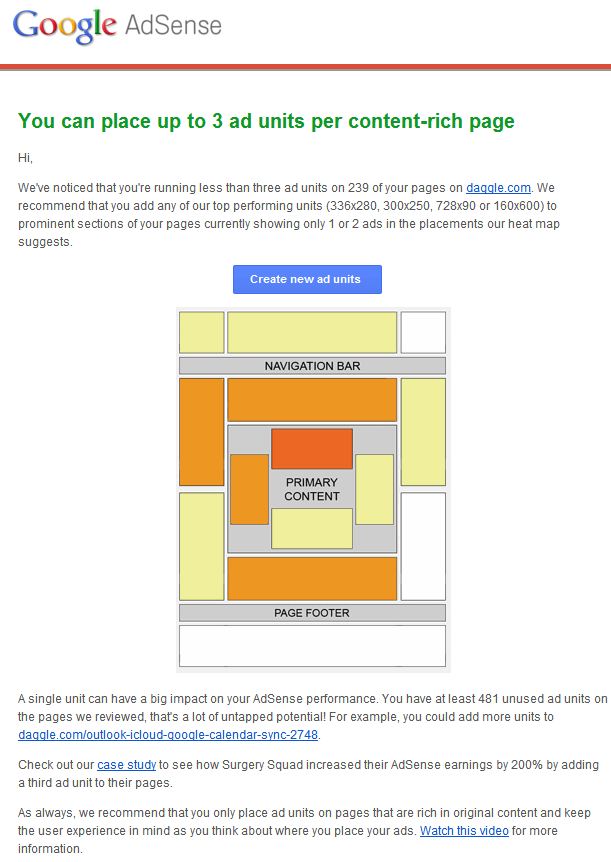
Ironically, on the same day that Google’s web search team announced this change, I received this message from Google’s AdSense team encouraging me to put more ads on my site:Pages Ad-Heavy, But Not Top-Heavy With Ads, May Escape
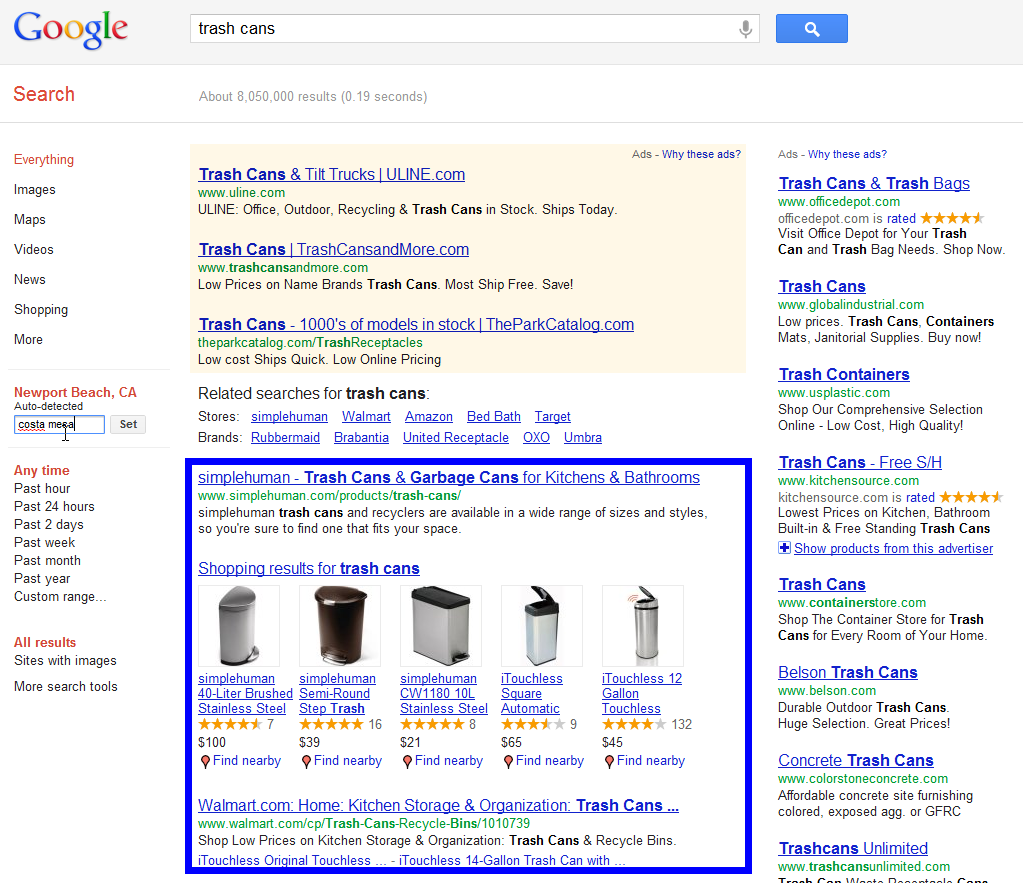
Are Google’s Own Search Results Top Heavy?
This is a site-based algorithm that looks at all the pages across an entire site in aggregate. Although it’s possible to find a few searches on Google that trigger many ads, it’s vastly more common to have no ads or few ads on a page.
Again, this algorithm change is designed to demote sites that make it difficult for a user to get to the content and offer a bad user experience.
Having an ad above-the-fold doesn’t imply that you’re affected by this change. It’s that excessive behavior that we’re working to avoid for our users.
Algorithms? Signals?
Name The Update & More Info
We have a variety of signals that algorithmically determine what type of ad or content appears above the fold, but no further details to share. It is completely algorithmic in its detection–we don’t use any sort of hard-coded list of ad providers.
The Penguin Update: Google’s Webspam Algorithm Gets Official Name
What’s An Update?
For those unfamiliar with Google updates, I’d recommend reading my Why Google Panda Is More A Ranking Factor Than Algorithm Update post from last year. It explains how Google has a variety of algorithms used to rank pages.Google periodically changes these algorithms. When this happens, that’s known as an “update,” which in turn has an impact on the search results we get. Sometimes the updates have a big impact; sometimes they’re hardly noticed.
Who Names Updates?
Google also periodically creates new algorithms. When this happens, sometimes they’re given names by Google itself, as with the Vince update in 2009. If Google doesn’t give a name, sometimes others such as Webmaster World may name them, as with the Mayday update in 2010.With Penguin, history is repeating itself, where Google is belatedly granting a name to an update after-the-fact. The same thing happened with Panda last year.
When the Panda Update was first launched in February 2011, Google didn’t initially release the name it was using internally. I knew it, but I wasn’t allowed say what it was. Without an official name, I gave it an unofficial one of “Farmer,” since one of the reasons behind the update was to combat low-quality content that was often seen associated with content farms.
In the end, I suspect Google didn’t want the update to sound like it was especially aimed at content farms, so it eventually let the “Panda” name go public, in a Steven Levy interview for Wired about the update about a week after it launched. Panda took its name from one of the key engineers involved.
Say Hello To Penguin
Since Panda, Google’s been avoiding names. The new algorithm in January designed to penalize pages with too many ads above the fold was called the “page layout algorithm.” When Penguin rolled out earlier this week, it was called the “webspam algorithm update.”Without a name for the new webspam algorithm, Search Engine Land was asking people for their own ideas at Google+ and Facebook, with the final vote making “Titanic” the leading candidate. A last check with Google got it to release its own official name of “Penguin.”
Search quality highlights: 40 changes for February
Here’s the list for February:
- More coverage for related searches. [launch codename “Fuzhou”] This launch brings in a new data source to help generate the “Searches related to” section, increasing coverage significantly so the feature will appear for more queries. This section contains search queries that can help you refine what you’re searching for.
- Tweak to categorizer for expanded sitelinks. [launch codename “Snippy”, project codename “Megasitelinks”] This improvement adjusts a signal we use to try and identify duplicate snippets. We were applying a categorizer that wasn’t performing well for our expanded sitelinks, so we’ve stopped applying the categorizer in those cases. The result is more relevant sitelinks.
- Less duplication in expanded sitelinks. [launch codename “thanksgiving”, project codename “Megasitelinks”] We’ve adjusted signals to reduce duplication in the snippets forexpanded sitelinks. Now we generate relevant snippets based more on the page content and less on the query.
- More consistent thumbnail sizes on results page. We’ve adjusted the thumbnail size for most image content appearing on the results page, providing a more consistent experience across result types, and also across mobile and tablet. The new sizes apply to rich snippet results for recipes and applications, movie posters, shopping results, book results, news results and more.
- More locally relevant predictions in YouTube. [project codename “Suggest”] We’ve improved the ranking for predictions in YouTube to provide more locally relevant queries. For example, for the query [lady gaga in ] performed on the US version of YouTube, we might predict [lady gaga in times square], but for the same search performed on the Indian version of YouTube, we might predict [lady gaga in India].
- More accurate detection of official pages. [launch codename “WRE”] We’ve made an adjustment to how we detect official pages to make more accurate identifications. The result is that many pages that were previously misidentified as official will no longer be.
- Refreshed per-URL country information. [Launch codename “longdew”, project codename “country-id data refresh”] We updated the country associations for URLs to use more recent data.
- Expand the size of our images index in Universal Search. [launch codename “terra”, project codename “Images Universal”] We launched a change to expand the corpus of results for which we show images in Universal Search. This is especially helpful to give more relevant images on a larger set of searches.
- Minor tuning of autocomplete policy algorithms. [project codename “Suggest”] We have a narrow set of policies for autocomplete for offensive and inappropriate terms. This improvement continues to refine the algorithms we use to implement these policies.
- “Site:” query update [launch codename “Semicolon”, project codename “Dice”] This change improves the ranking for queries using the “site:” operator by increasing the diversity of results.
- Improved detection for SafeSearch in Image Search. [launch codename "Michandro", project codename “SafeSearch”] This change improves our signals for detecting adult content in Image Search, aligning the signals more closely with the signals we use for our other search results.
- Interval based history tracking for indexing. [project codename “Intervals”] This improvement changes the signals we use in document tracking algorithms.
- Improvements to foreign language synonyms. [launch codename “floating context synonyms”, project codename “Synonyms”] This change applies an improvement we previously launched for English to all other languages. The net impact is that you’ll more often find relevant pages that include synonyms for your query terms.
- Disabling two old fresh query classifiers. [launch codename “Mango”, project codename “Freshness”] As search evolves and new signals and classifiers are applied to rank search results, sometimes old algorithms get outdated. This improvement disables two old classifiers related to query freshness.
- More organized search results for Google Korea. [launch codename “smoothieking”, project codename “Sokoban4”] This significant improvement to search in Korea better organizes the search results into sections for news, blogs and homepages.
- Fresher images. [launch codename “tumeric”] We’ve adjusted our signals for surfacing fresh images. Now we can more often surface fresh images when they appear on the web.
- Update to the Google bar. [project codename “Kennedy”] We continue to iterate in our efforts to deliver a beautifully simple experience across Google products, and as part of that this month we made further adjustments to the Google bar. The biggest change is that we’ve replaced the drop-down Google menu in the November redesign with a consistent and expanded set of links running across the top of the page.
- Adding three new languages to classifier related to error pages. [launch codename "PNI", project codename "Soft404"] We have signals designed to detect crypto 404 pages (also known as “soft 404s”), pages that return valid text to a browser but the text only contain error messages, such as “Page not found.” It’s rare that a user will be looking for such a page, so it’s important we be able to detect them. This change extends a particular classifier to Portuguese, Dutch and Italian.
- Improvements to travel-related searches. [launch codename “nesehorn”] We’ve made improvements to triggering for a variety of flight-related search queries. These changes improve the user experience for our Flight Search feature with users getting more accurate flight results.
- Data refresh for related searches signal. [launch codename “Chicago”, project codename “Related Search”] One of the many signals we look at to generate the “Searches related to” section is the queries users type in succession. If users very often search for [apple] right after [banana], that’s a sign the two might be related. This update refreshes the model we use to generate these refinements, leading to more relevant queries to try.
- International launch of shopping rich snippets. [project codename “rich snippets”]Shopping rich snippets help you more quickly identify which sites are likely to have the most relevant product for your needs, highlighting product prices, availability, ratings and review counts. This month we expanded shopping rich snippets globally (they were previously only available in the US, Japan and Germany).
- Improvements to Korean spelling. This launch improves spelling corrections when the user performs a Korean query in the wrong keyboard mode (also known as an "IME", or input method editor). Specifically, this change helps users who mistakenly enter Hangul queries in Latin mode or vice-versa.
- Improvements to freshness. [launch codename “iotfreshweb”, project codename “Freshness”] We’ve applied new signals which help us surface fresh content in our results even more quickly than before.
- Web History in 20 new countries. With Web History, you can browse and search over your search history and webpages you've visited. You will also get personalized search results that are more relevant to you, based on what you’ve searched for and which sites you’ve visited in the past. In order to deliver more relevant and personalized search results, we’ve launched Web History in Malaysia, Pakistan, Philippines, Morocco, Belarus, Kazakhstan, Estonia, Kuwait, Iraq, Sri Lanka, Tunisia, Nigeria, Lebanon, Luxembourg, Bosnia and Herzegowina, Azerbaijan, Jamaica, Trinidad and Tobago, Republic of Moldova, and Ghana. Web History is turned on only for people who have a Google Account and previously enabled Web History.
- Improved snippets for video channels. Some search results are links to channels with many different videos, whether on mtv.com, Hulu or YouTube. We’ve had a feature for a while now that displays snippets for these results including direct links to the videos in the channel, and this improvement increases quality and expands coverage of these rich “decorated” snippets. We’ve also made some improvements to our backends used to generate the snippets.
- Improvements to ranking for local search results. [launch codename “Venice”] This improvement improves the triggering of Local Universal results by relying more on the ranking of our main search results as a signal.
- Improvements to English spell correction. [launch codename “Kamehameha”] This change improves spelling correction quality in English, especially for rare queries, by making one of our scoring functions more accurate.
- Improvements to coverage of News Universal. [launch codename “final destination”] We’ve fixed a bug that caused News Universal results not to appear in cases when our testing indicates they’d be very useful.
- Consolidation of signals for spiking topics. [launch codename “news deserving score”, project codename “Freshness”] We use a number of signals to detect when a new topic is spiking in popularity. This change consolidates some of the signals so we can rely on signals we can compute in realtime, rather than signals that need to be processed offline. This eliminates redundancy in our systems and helps to ensure we can continue to detect spiking topics as quickly as possible.
- Better triggering for Turkish weather search feature. [launch codename “hava”] We’ve tuned the signals we use to decide when to present Turkish users with the weather search feature. The result is that we’re able to provide our users with the weather forecast right on the results page with more frequency and accuracy.
- Visual refresh to account settings page. We completed a visual refresh of the account settings page, making the page more consistent with the rest of our constantly evolving design.
- Panda update. This launch refreshes data in the Panda system, making it more accurate and more sensitive to recent changes on the web.
- Link evaluation. We often use characteristics of links to help us figure out the topic of a linked page. We have changed the way in which we evaluate links; in particular, we are turning off a method of link analysis that we used for several years. We often rearchitect or turn off parts of our scoring in order to keep our system maintainable, clean and understandable.
- SafeSearch update. We have updated how we deal with adult content, making it more accurate and robust. Now, irrelevant adult content is less likely to show up for many queries.
- Spam update. In the process of investigating some potential spam, we found and fixed some weaknesses in our spam protections.
- Improved local results. We launched a new system to find results from a user’s city more reliably. Now we’re better able to detect when both queries and documents are local to the user.
And here are a few more changes we’ve already blogged about separately:
- Flight Search on mobile
- Improved health searches
- Better related searches for images
- Upcoming concert dates
Posted by Amit Singhal, Senior VP and Google Fellow